
RISE vs Sleep Cycle is sleep debt and circadian coaching versus a smart alarm and sound recorder. RISE tells you how much sleep you need and when to get it. Sleep Cycle records snoring and aims to wake you in a lighter phase. You can use both — Sleep Cycle writes to Apple Health, and RISE can read it.
| Compared | RISE | Sleep Cycle |
|---|---|---|
| Focus | Behavior change — pay down sleep debt and align with your circadian rhythm | Smart alarm, sound recording, and a content library |
| Price | $69.99/year (Sleep & Energy Premium). Monthly and Lifetime plans exist. | Freemium. Premium subscription; official site does not publish one list price (App Store shows more than one yearly SKU) |
| Trial | 7 days free | 7-day free trial |
| Platform | iOS and Android | iOS, iPadOS, Android, optional Apple Watch |
| Wearable required? | No — phone is enough; wearables optional | No — phone on the nightstand |
| What it measures | Sleep need, 14-night sleep debt, circadian timing (Melatonin Window) | Duration, stages, quality, routine, snoring sounds, Sleep Score |
| Method | Phone-use models plus optional wearable/Health data; not a stage-scoring wearable | Sound analysis and/or accelerometer; Smart Alarm aims at a lighter phase in a wake window |
| Data sources | On-device phone behavior; optional Apple Health / Health Connect wearables | Phone mic, phone accelerometer, optional Apple Watch / Apple Health |
| Works with RISE? | This is RISE | Yes — writes sleep to Apple Health; RISE can read it |
Prices and features last verified 2026-08-18. Check each product’s site for the current figure.
RISE and Sleep Cycle are both apps that track your sleep, but they focus on different metrics and there are a few features that differentiate them.
Below, we’ll explain what each app does to help you decide between the two.
The RISE app tracks your sleep debt. Sleep Cycle doesn’t track sleep debt.
Sleep debt is the amount of sleep you owe your body. It’s compared against your sleep need, which is the unique and genetically determined amount of sleep you need
Sleep researchers agree sleep debt is one of the biggest factors affecting how you feel and function each day. The lower your sleep debt, the better your energy, productivity, wellness, digestion, skin, mental health, safety behind the wheel, and athletic performance will be — and the list could go on.
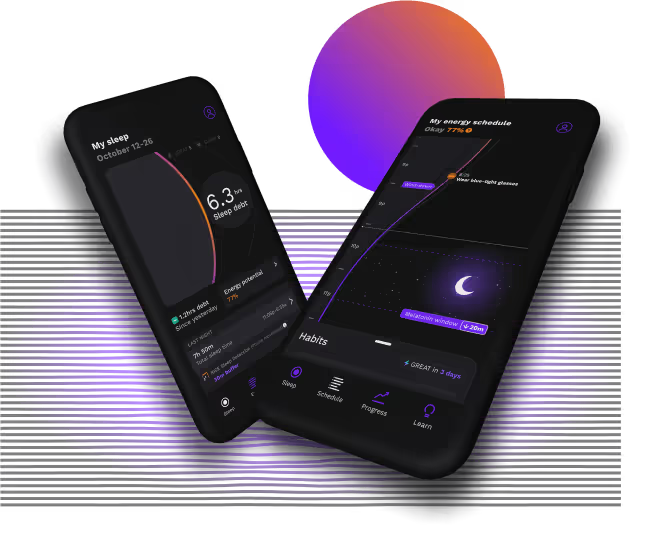
RISE makes it easy to improve your sleep and daily energy to reach your potential


Yes, RISE tracks sleep. RISE doesn’t just tell you your sleep duration, though. It calculates your unique sleep need and how much sleep debt you have, and gives you advice based on your body clock to help you get a better night of sleep.
RISE can track your sleep by:
Sleep data is interesting, but to improve your sleep, you need to first find out how much of it you need. It’s not simply eight hours for everyone. When we looked at the sleep needs of 1.95 million RISE users aged 24 and up, we found it ranged from five hours to 11 hours 30 minutes.
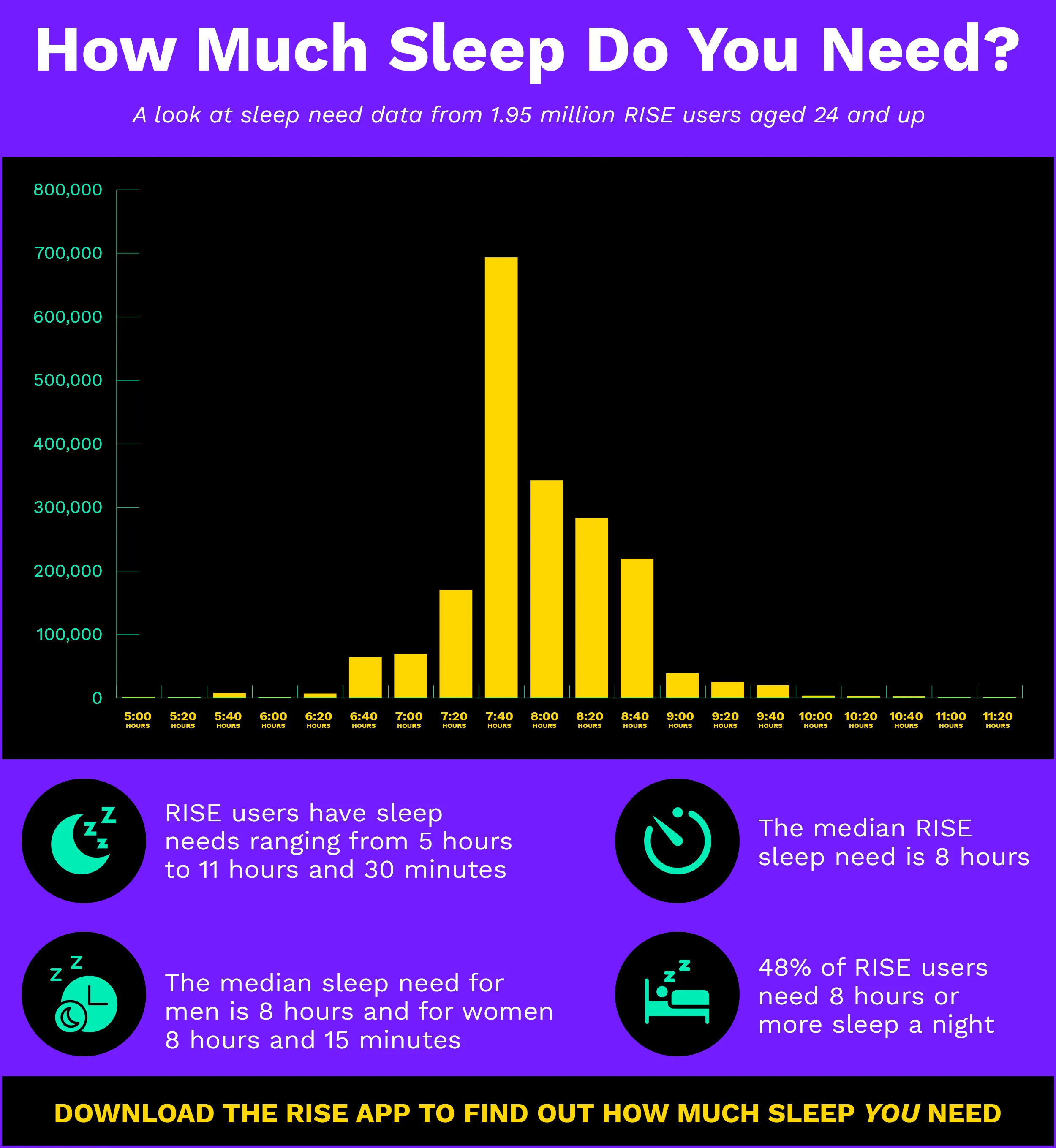
RISE calculates your individual sleep need based on sleep science algorithms and a year’s worth of your phone use behavior.
It then works out your sleep debt based on how much sleep you’ve gotten over the last 14 nights. You can also add in any naps you take. We place more weight — 15% to be exact — on last night’s sleep, and the remaining 85% of sleep debt comes from the previous 13 nights.
You can check your sleep debt — and other RISE data — from the app, your iPad, Apple Watch, or a widget on your iPhone home screen.
RISE works out your sleep debt number and helps you lower it. Eliminating sleep debt entirely may not be achievable for many of us, but reducing it as much as possible can help you feel and perform your best.
You can learn more about how to lower sleep debt here.
We’ve covered more on sleep debt tracking apps here, including why RISE is the most accurate.
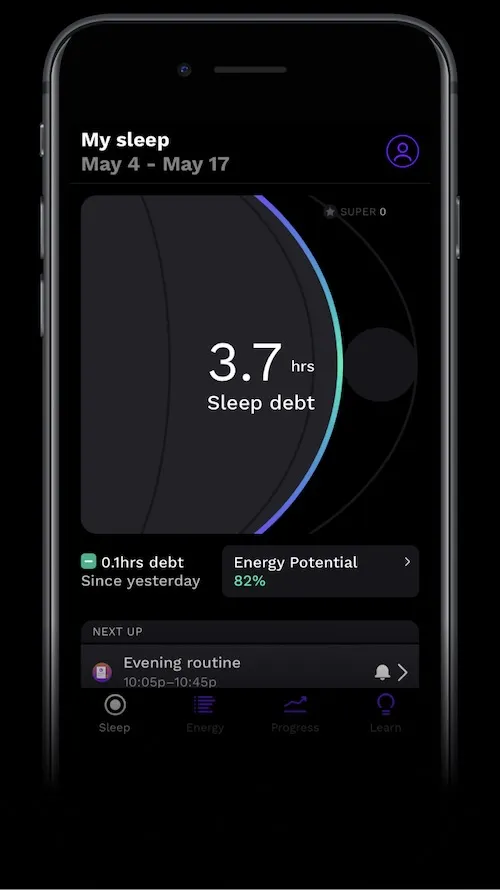
RISE users on iOS 1.202 and above can view their sleep debt here.
Yes, Sleep Cycle tracks sleep. It uses your phone’s accelerometer to track movements or the microphone (which it says is more accurate) to track sounds.
You can sleep with your phone on your nightstand or mattress. You can also use the Sleep Cycle app on your iPad or the accelerometer on your Apple Watch.
Sleep Cycle tracks your time in bed, time asleep, how long it takes you to fall asleep, sleep regularity, sleep quality, and sleep stages (more on those last two soon).
You can also see how your sleep times compare to other countries and listen to any sound recordings taken during the night. These are useful for ending the “I don’t snore” argument and checking for signs of sleep apnea. If you notice any gasping noises, loud snoring, or changes in your snoring, reach out to a healthcare provider.
Sleep Cycle doesn’t work out how much sleep you need or recommend a generic sleep duration to aim for. You set your own sleep duration goal in the app.
The RISE app doesn’t track your sleep quality. Sleep Cycle does track sleep quality.
Sleep Cycle gives you a sleep quality score based on how long you spent in bed, deep sleep, and awake, and how much you moved during the night.
There are a few problems with sleep quality as a metric, however. For one, there’s no agreed-upon definition for sleep quality, both among sleep scientists and the everyday sleeper. And sleep trackers use different metrics or their own sleep scores. When you don’t know what goes into a sleep quality score, it’s hard to know how you can improve it or whether it’s even tracking metrics that make a difference to how you feel.
Sleep debt, unlike sleep quality, is proven to make a difference to how you feel each day.
In RISE, you can self-rate your sleep quality. Research — including this 2023 study — shows how satisfied you feel with your sleep can make a difference to how you feel each day. So self-rating your sleep quality may help you understand your energy levels more than what a sleep tracker tells you about your sleep quality.
RISE waits 90 minutes after you wake up before asking you to rate your sleep quality. This gives you enough time to shake off sleep inertia, or grogginess.
Sleep Cycle asks you to rate your mood as soon as you wake up, so grogginess might be clouding how you really feel.
Learn more about sleep tracking and sleep quality here.
The RISE app doesn’t track sleep stages. Sleep Cycle does track sleep stages.
Sleep Cycle estimates your sleep stages based on sounds and movements. Some sound and movement indicate light sleep, whereas limited or no sound and movement indicate deep sleep. Sleep Cycle doesn’t track your REM sleep.
Seeing how long you spent in different sleep stages is interesting, but it’s not that useful. You can’t control how long you spend in each sleep stage, so you don’t need to worry about it. And as we all need a different amount of sleep, we all need to spend a different amount of time in each sleep stage, and this can change from night to night. So seeing your numbers without knowing how much sleep you need doesn’t really mean much.
Plus, a 2022 study (among others) shows sleep trackers aren’t that accurate at tracking sleep stages anyway. And this research looked at wearable devices that use skin-touching sensors to try and track sleep stages, not just sound and movement.
Learn why you don’t need to track deep sleep and REM sleep here.
The RISE app tracks your circadian rhythm. Sleep Cycle doesn’t track your circadian rhythm.
Your circadian rhythm is your internal body clock. How in sync you are with it is another important factor determining how well you sleep and how you feel and perform each day.
RISE predicts the timing of your circadian rhythm using your inferred light exposure, recent sleep times, and algorithms built on the SAFTE model developed by the US Department of Transportation and the Department of Defense.
You can then:
Sleep Cycle has a Sleep Notes feature that allows you to manually make a note of certain behaviors, like a late afternoon coffee, so you can look for patterns and see if these behaviors affect your sleep quality. You won’t see how these behaviors (or how your sleep times) affect your energy levels.
We cover more about how RISE predicts your circadian rhythm here and how to use RISE as a personal energy tracker here.
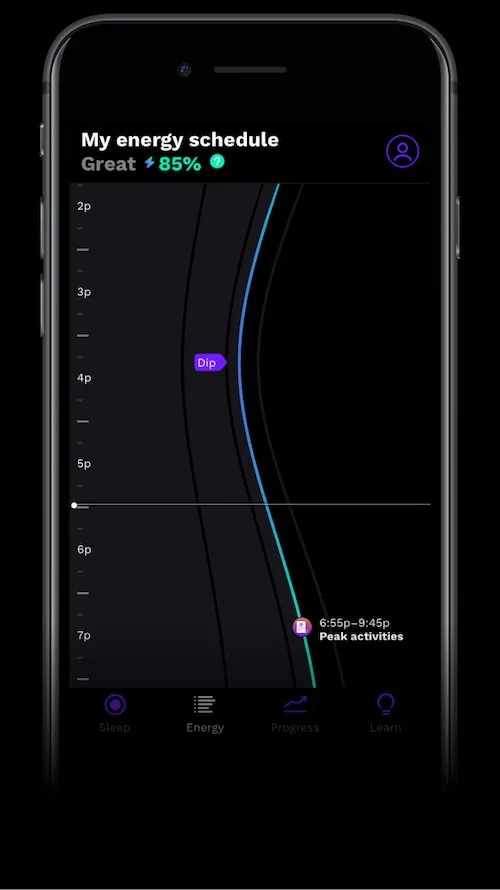
RISE users on iOS 1.202 and above can see their circadian rhythm on the Energy screen here.
Here’s what else RISE and Sleep Cycle offer:
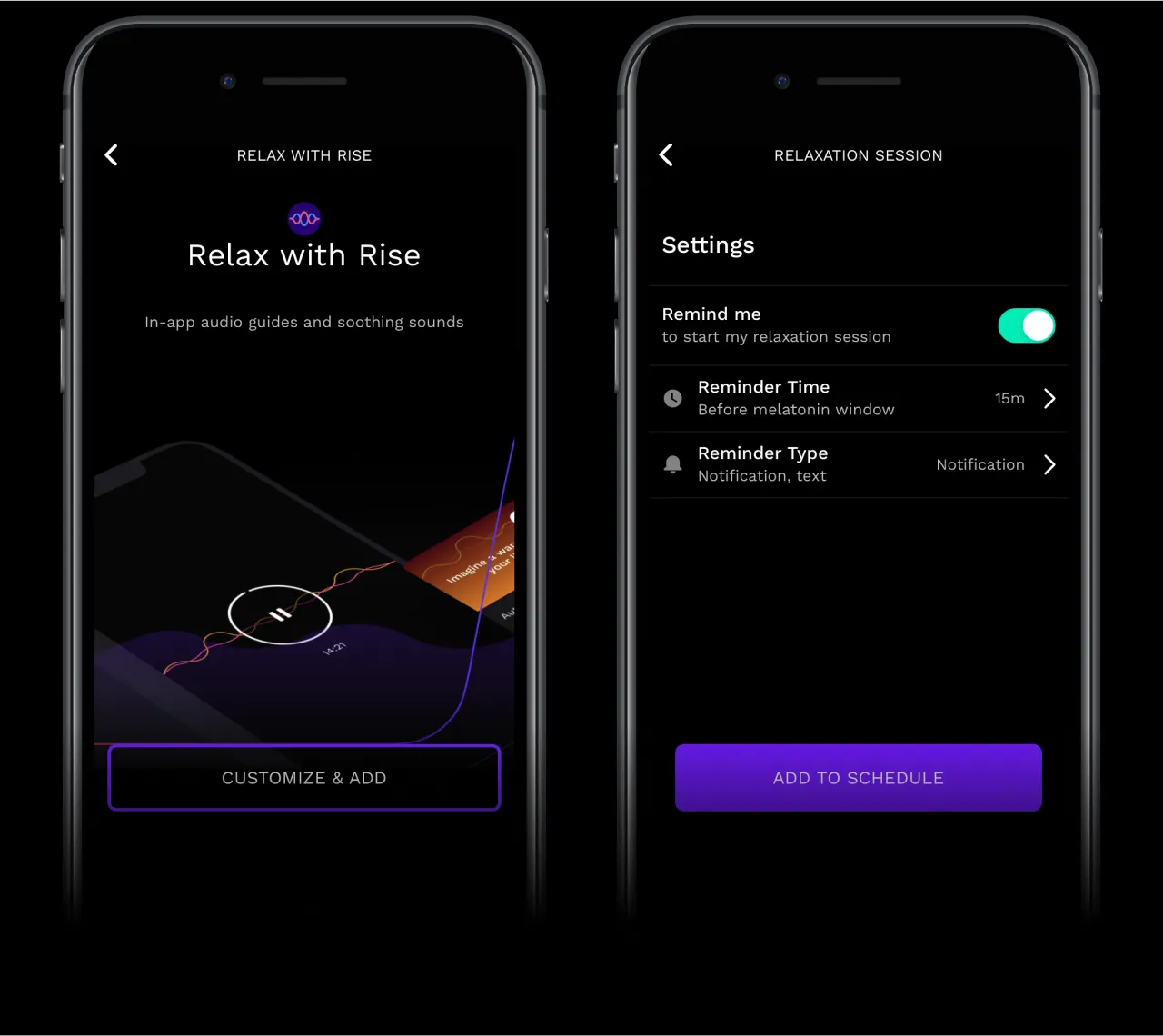
The RISE app costs $69.99 a year, which works out to $5.83 a month.
You can try RISE free for seven days to find out your sleep need, sleep debt, and circadian rhythm predictions. You can also see how timed sleep hygiene habit reminders can help you get more sleep and energy.
Sleep Cycle costs $39.99 a year (at the time of writing), which works out to $3.33 a month.
You can do a one-week free trial. There is a free version of Sleep Cycle. This includes features like the smart alarm and sleep tracking. You won’t get features like the sound recordings, content library, or full access to all of the statistics.
Here’s what users love about using RISE and Sleep Cycle together:
RISE tracks — and helps you improve — your sleep debt and circadian rhythm. These are the two sleep and energy metrics that make the biggest difference to your days. We’ve found 80% of users feel the benefits in as little as five days.
Sleep Cycle records sounds at night and has a larger library of content to help you drift off. You can also use the app to find out how long it takes you to fall asleep and track your sleep regularity.
You can combine the two to get sleep debt and circadian rhythm insights and personalized guidance from RISE and sound recordings, further sleep metrics, and a wider choice of relaxing content from Sleep Cycle.
RISE vs Sleep Cycle is a focus split. RISE computes your sleep need, 14-night sleep debt, and circadian timing, then coaches you to pay the debt down. Sleep Cycle is a smart alarm and sound recorder. It scores duration, stages, quality, and snoring from your phone mic or accelerometer. You do not need a wearable for either app. Sleep Cycle can write sleep to Apple Health, so RISE can read those nights if you want both.
Yes. Sleep Cycle writes sleep to Apple Health, and RISE can read that data. Keep Sleep Cycle if you want snore recordings, a larger sound library, or its smart alarm. Use RISE for the number Sleep Cycle does not compute: how much sleep you personally need, how much 14-night debt you carry, and when your body wants that sleep. You can use both.
No. Sleep Cycle tracks duration, stages, quality, routine, snoring sounds, and a Sleep Score. It does not compute a personal sleep need or a 14-night sleep-debt total. If debt is the number you want, that is what RISE is for. You can still keep Sleep Cycle for the smart alarm and overnight sound recording, and let RISE read the nights it writes to Apple Health.
RISE Sleep and Energy Premium is $69.99 a year, with monthly and lifetime plans, and a seven-day free trial. Sleep Cycle is freemium with a Premium subscription; the official site does not publish one list price, and App Store yearly SKUs vary, so treat the dollar figure as subscription, price varies. Both can run from your phone, so you are not buying a wearable to start.
No. RISE can run from on-device phone behavior, with Apple Health or Health Connect wearables optional. Sleep Cycle can run from the phone mic and accelerometer on the nightstand, with an optional Apple Watch. A wearable can add heart-rate or stage data, but neither app requires one. If you already wear a Watch, both can read or write through Apple Health.